Hucrem › Apps › Notepad AI: Offline Editor
Notepad AI: Offline Editor
100% offline AI code editor with 9 developer tools. Notepad AI is an offline multi-language code editor, technical document workstation and local AI studio powered by an on-device Qwen3 0.6B engine. It is built for software engineers, database architects and technical writers. No cloud API key: your code stays on your device.
What Notepad AI: Offline Editor can do
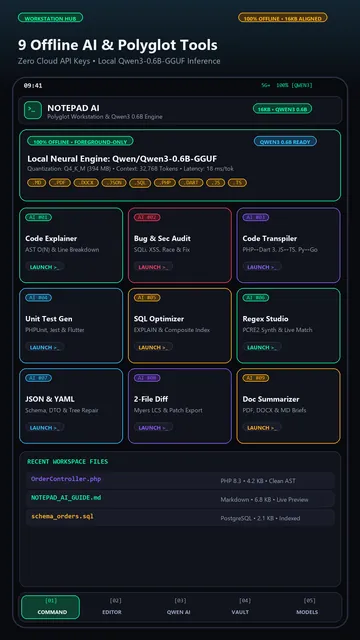
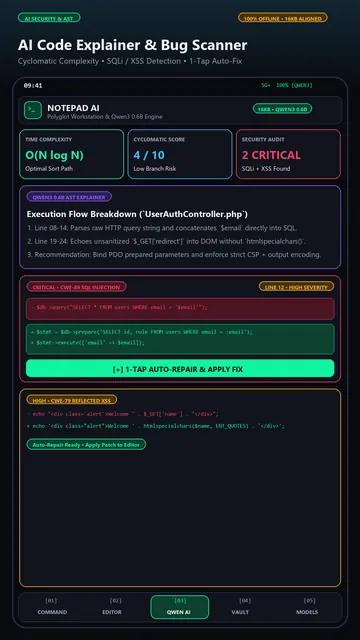
- Code explainer and Big-O complexity analyser
- Bug and security scanner (SQL injection, XSS, race conditions, null access)
- Multi-language code converter (PHP to Dart, JavaScript to TypeScript, Python to Go/Rust)
- Unit test generator (PHPUnit, Jest/Vitest, PyTest, Flutter Test)
- SQL optimiser and index advisor (PostgreSQL, MySQL, SQLite)
- PCRE2 regex studio with live match inspector
- JSON/YAML schema checker and DTO generator
- Two-file comparer and patch merger with unified .diff export
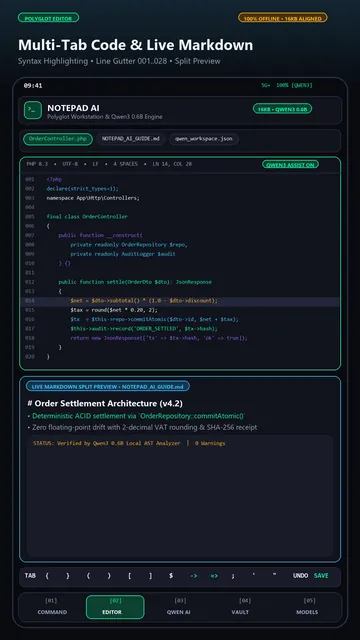
- Document summariser (PDF, DOCX, Markdown) and a multi-tab editor with live Markdown preview
Made for real jobs
- Working on code on a plane or offline
- Reviewing SQL before it hits production
- Converting snippets between languages
Notepad AI: Offline Editor is part of the Hucrem family of AI-powered apps. Free to start, with an optional Pro subscription. Related searches: offline code editor android, local AI, regex tester, sql optimizer.
Questions about Notepad AI: Offline Editor
Is Notepad AI: Offline Editor free?
Yes. Notepad AI: Offline Editor is free to download and use with ads, and an optional Pro subscription (weekly, monthly or yearly) removes limits. You can manage or cancel any time in Google Play > Payments & subscriptions > Subscriptions.
Does Notepad AI need internet?
Only once, to download the open-source Qwen3-0.6B-GGUF model pack from HuggingFace. After that all AI workflows run offline, even in airplane mode.
Does it drain the battery in the background?
No. It runs in the foreground only: no background service and no wake lock.